

Why Small Business Threat Intelligence Is No Longer Optional
Small business threat intelligence is the practice of collecting, analyzing, and acting on data about cyber threats — so you can stop attacks before they happen instead of scrambling to recover after.
Quick answer: What is small business threat intelligence and why does it matter?
| Question | Answer |
|---|---|
| What is it? | Collecting and analyzing data on cyber threats to understand who targets you, how, and why |
| Who needs it? | Any small business that stores customer data, processes payments, or relies on digital systems |
| What does it prevent? | Ransomware, phishing, data breaches, supply chain attacks |
| Is it affordable? | Yes — sharing partnerships, ISACs, and modern tools have made it accessible to SMBs |
| What’s the risk of skipping it? | 40% of SMBs say a $100,000 or less cyberattack could put them out of business |
For the first time ever, cybersecurity has overtaken inflation and recession as the #1 business concern for small businesses in 2026. That’s not a coincidence.
Attackers are now using AI to launch phishing campaigns that are 4.5 times more effective than traditional attacks. Ransomware variants change daily. And 84% of small business owners are still trying to manage all of this alone — many without adequate training.
The hard truth is that most small businesses aren’t too small to be targeted. They’re targeted because they’re small. Limited budgets, outdated tools, and no dedicated security team make them easy marks. And when something goes wrong, the fallout hits fast: lost revenue, broken customer trust, and in many cases, permanent closure.
Threat intelligence changes this dynamic. Instead of reacting to attacks after the damage is done, you get the context to see threats coming and act first.
I’m Tony Bojko, owner of Sail-On Enterprises LLC, and I’ve spent years helping small businesses in Oklahoma and across the U.S. navigate exactly these kinds of IT and security challenges as a managed IT and fractional CIO consultant — including helping clients understand and apply small business threat intelligence without enterprise-level budgets. In the sections ahead, I’ll break down everything you need to know to put it to work for your business.
Understanding Small Business Threat Intelligence

When we talk about small business threat intelligence, we are talking about transforming raw data into evidence-based knowledge. It isn’t just a list of “bad” IP addresses. It is a deep dive into the motives, targets, and attack methodologies of the people trying to break into your systems.
Think of it like a neighborhood watch program for the digital age. If you know that burglars in your area are currently using a specific type of tool to pop open sliding glass doors, you don’t just sit around and wait for them to show up. You go out and reinforce your sliding doors. That is threat intelligence in action.
For an SMB, this means understanding Common Cyber Threats for Small Businesses and realizing that your data—whether it’s customer credit card numbers or your internal payroll—has value on the dark web. Research shows that organizations are now facing over 35,000 new malware samples daily. Without intelligence to filter through that noise, you’re just guessing where to spend your security budget.
One of the simplest ways to act on intelligence is knowing which software is being targeted right now. We often see vulnerabilities from 2012 and 2023 still being exploited in May 2026 because businesses haven’t patched them. This is why we emphasize 3 Reasons to Keep Your Systems Up to Date—intelligence tells us what the attackers are looking for, and patching takes that target off your back.
Tactical, Operational, and Strategic Intelligence
Threat intelligence is usually broken down into three “flavors.” Understanding which one you need helps you avoid wasting resources.
- Tactical Intelligence: This is the most “boots on the ground” version. It focuses on Indicators of Compromise (IOCs)—things like specific malicious URLs, file hashes, or IP addresses. It’s what your firewall uses to block a known bad actor.
- Operational Intelligence: This looks at the “How.” It examines the Tactics, Techniques, and Procedures (TTPs) of threat actors. For example, knowing that a group like “Sapphire Sleet” is currently targeting macOS systems via npm supply chains is operational intelligence.
- Strategic Intelligence: This is high-level info for the “Why.” It looks at broad trends, like how geopolitical events might lead to an increase in state-sponsored attacks on U.S. infrastructure. This helps with executive decision-making and long-term budgeting.
For most Tulsa businesses, a mix of tactical and operational intelligence is the sweet spot. You need to know what to block today and how to adjust your defenses for tomorrow. Following Cybersecurity Standards and Frameworks like NIST can help you organize this data into a usable plan.
Moving from Reactive to Proactive Small Business Threat Intelligence
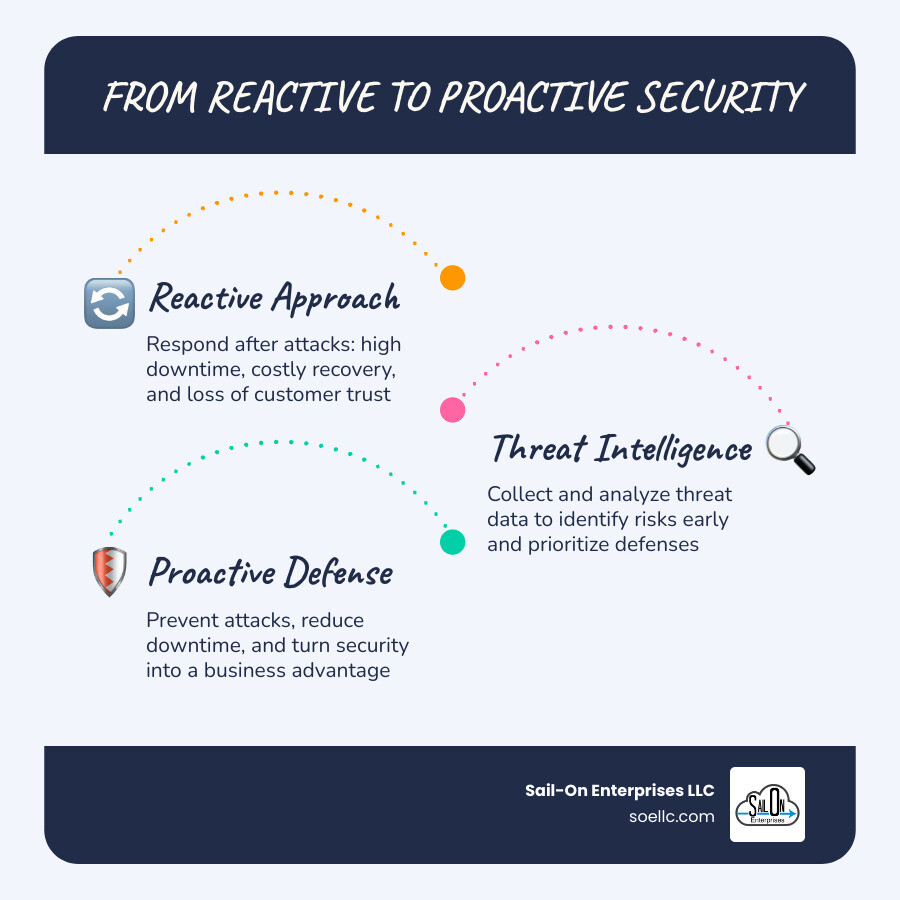
Most small businesses operate in a “reactive” mode. They wait for the computer to slow down, the file to be encrypted, or the bank account to be drained before they call for help. By then, the damage is done.
Proactive small business threat intelligence flips the script. Instead of waiting for a breach, you use intelligence to:
- Preempt attacks: If intelligence shows a spike in “payroll diversion” attacks targeting local Oklahoma firms, you can warn your HR team before the first fake email arrives.
- Reduce downtime: Knowing which vulnerabilities are actively being exploited allows you to prioritize the right patches, preventing the outages that 73% of SMBs faced last year.
- Mitigate risk: You can focus your limited budget on the threats most likely to hit your specific industry.
If you don’t have the time to track 100 trillion security signals (like Microsoft does daily), that’s where Professional IT Support in Tulsa comes in. We do the heavy lifting of monitoring the landscape so you can focus on running your business.
Key Benefits and Practical Use Cases for SMBs

The biggest benefit of threat intelligence is clarity. In the middle of a workday, you don’t need 500 alerts; you need to know which one alert actually matters.
- Alert Prioritization: Intelligence tools can give vulnerabilities an “SMB Attack Probability Score.” If a bug has a 95/100 score and is being used in the wild, you fix it today. If it’s a low-risk bug that requires physical access to your server room, it can wait until Friday.
- Incident Response Speed: When you know a specific ransomware group is active, your response team (or your MSP) can look for the exact “footprints” that group leaves behind, cutting response time from hours to minutes.
A great example is WordPress Security: What You Need to Do Now. In early 2026, a malicious update to a popular slider plugin was distributed for just six hours, but it installed backdoors on thousands of sites. Intelligence allowed proactive admins to identify and clean those sites before the backdoors were ever used.
Defending Against AI-Powered Phishing and Ransomware
In May 2026, the biggest threat we see is AI-automated phishing. It’s no longer just “bad grammar” emails from a “prince.” AI creates hyper-personalized lures that are nearly impossible for the average employee to spot.
We’ve seen the rise of platforms like Tycoon2FA, a phishing-as-a-service tool that bypasses Multi-Factor Authentication (MFA). It has targeted over 500,000 organizations. Intelligence tells us that these attackers often use “code of conduct” lures to steal login tokens.
Another growing trend is payroll diversion. Attackers compromise an employee’s email and then message the HR department to change their direct deposit info. By the time the employee realizes they weren’t paid, the money is long gone. Staying updated with the Latest Cybersecurity Alerts and Advisories is a free way to keep these TTPs on your radar.
Securing the Supply Chain and Remote Access
Small businesses are often the “back door” into larger companies. This is called a supply chain attack. If you are a vendor for a large Tulsa manufacturer, a breach at your office could give hackers a path into theirs.
- OAuth Connections: Many of us use “Sign in with Google” or “Sign in with Microsoft” for third-party apps. If one of those vendors is compromised, the hacker might inherit access to your data. Intelligence helps you audit these connections.
- SOHO Router Security: Small Office/Home Office (SOHO) routers are a favorite target for groups like “Forest Blizzard.” They use them for DNS hijacking to steal credentials.
- Remote Work: As we move toward more flexible environments, using Tools and Tips for Enabling Remote Workers is essential. Intelligence tells us that unpatched VPNs are a primary entry point for ransomware.
Overcoming Implementation Challenges on a Budget
One of the biggest hurdles is the “DIY” trap. Many SMB owners think they can just install a free antivirus and be done. But as we’ve seen, 84% of SMBs self-manage their security, yet 40% admit they could be put out of business by a single $100,000 attack.
| Feature | DIY Threat Intelligence | Managed Threat Intelligence |
|---|---|---|
| Cost | Low (Time Intensive) | Moderate (Predictable Monthly) |
| Expertise | Requires constant training | Expert team included |
| Coverage | Often “set and forget” | 24/7/365 monitoring |
| Response | Slow (You have to find it) | Fast (Automated/Managed) |
| Tools | Disconnected free feeds | Integrated XDR/SIEM platforms |
Small businesses often face “technical debt”—old servers and unpatched software that are expensive to fix. But ignoring them is “security debt,” and the interest rate is a ransomware payout. This is Why Local Expertise Matters for Tulsa Businesses; we understand the local threat landscape and can help you prioritize your spend where it counts.
Affordable Sources for Small Business Threat Intelligence
You don’t need a million-dollar budget to get good data.
- ISACs (Information Sharing and Analysis Centers): These are industry-specific groups where businesses share threat data.
- Open-Source Feeds: Projects like the CISA Known Exploited Vulnerabilities (KEV) catalog provide a daily list of what hackers are actually using.
- Automated Scoring: Tools like the EPSS (Exploit Prediction Scoring System) help you see which bugs are most likely to be exploited next.
If you are Operating in the Cloud, many platforms like Microsoft 365 Business Premium have threat intelligence built-in, processing trillions of signals to protect your email and files automatically.
Building Your Effective Threat Intelligence Program
Building a program doesn’t happen overnight. It follows a six-stage lifecycle:
- Discovery (Requirements): What do you need to protect? (e.g., customer data, intellectual property).
- Collection: Gathering data from internal logs and external feeds.
- Processing: Cleaning up the data so it’s readable.
- Analysis: Determining what the data means for your business.
- Action (Dissemination): Updating your firewall, patching a server, or training staff.
- Feedback Loop: Did it work? How can we do it better next time?
Integrating Small Business Threat Intelligence into Existing Tools
You don’t necessarily need a brand-new platform. Most modern security tools can ingest threat intelligence feeds.
- Firewalls: Can be set to automatically block IPs from known botnets.
- SIEM (Security Information and Event Management): Can correlate your internal logs with global threat data to spot “quiet” intrusions.
- Vulnerability Scanning: Use intelligence to scan for the bugs that are currently being exploited by ransomware groups.
Your digital presence is your front door. If your security is weak, Your Website is Costing You Customers because they won’t trust you with their data.
Frequently Asked Questions about SMB Cyber Threats
How does threat intelligence help prioritize vulnerabilities?
It uses real-world data to move beyond simple “High/Medium/Low” rankings. By looking at exploit likelihood and active exploitation, intelligence tells you which vulnerabilities are actually being used by hackers today. This allows for asset-level prioritization, ensuring your most critical servers are patched first.
Is threat intelligence too expensive for a small company?
Not anymore. While “Enterprise” feeds can be pricey, sharing partnerships and affordable tools have leveled the playing field. In fact, think of it as a recurring operational expense—like insurance. The cost of a managed program is far lower than the “cost of inaction,” which can exceed $100,000 for a single breach.
What is the difference between raw data and actionable intelligence?
Raw data is a list of 10,000 “bad” IP addresses. Actionable intelligence is a report that says, “Three of your vendors use a specific software that was hacked this morning; here is how to temporarily block their access until they patch.” It provides contextual analysis and decision support tailored to your specific business.
Conclusion
In 2026, the question isn’t whether you’ll be targeted, but whether you’ll be ready. Small business threat intelligence is the key to moving from a state of constant anxiety to a state of proactive defense.
At Sail-On Enterprises LLC, we specialize in bringing this level of protection to the Tulsa business community. You don’t have to sacrifice your personal time or risk your business’s future by trying to handle cybersecurity alone. We provide the enterprise-level support you need to ensure your business doesn’t just survive, but grows.
Secure your future with professional IT services and let us help you turn the tide against cyber threats.